Mark each segment
Use one duration marker for a complete segment, or pair two point markers to define its IN and OUT.
 Segment TC
FOR PREMIERE PRO + DAVINCI RESOLVE STUDIO
Place markers at each segment’s IN and OUT points. Segment TC reads the timeline, calculates each segment’s duration (TRT), and exports one clear 1920×1080 PNG slate for delivery.
MARKERS IN
SLATE OUT00:00:02WHAT IT REPLACES
A segment slate lists when every program segment starts, when it ends and how long it runs. Segment TC builds that list from markers already on your timeline, reducing manual calculations and typing errors.
HOW IT WORKS
Use one duration marker for a complete segment, or pair two point markers to define its IN and OUT.
Add the series title, episode and media ID. Segment TC reads the markers and calculates every TRT.
Export one full-HD image with the program details, total duration and a timecode row for every segment.
THE FILE YOU RECEIVE
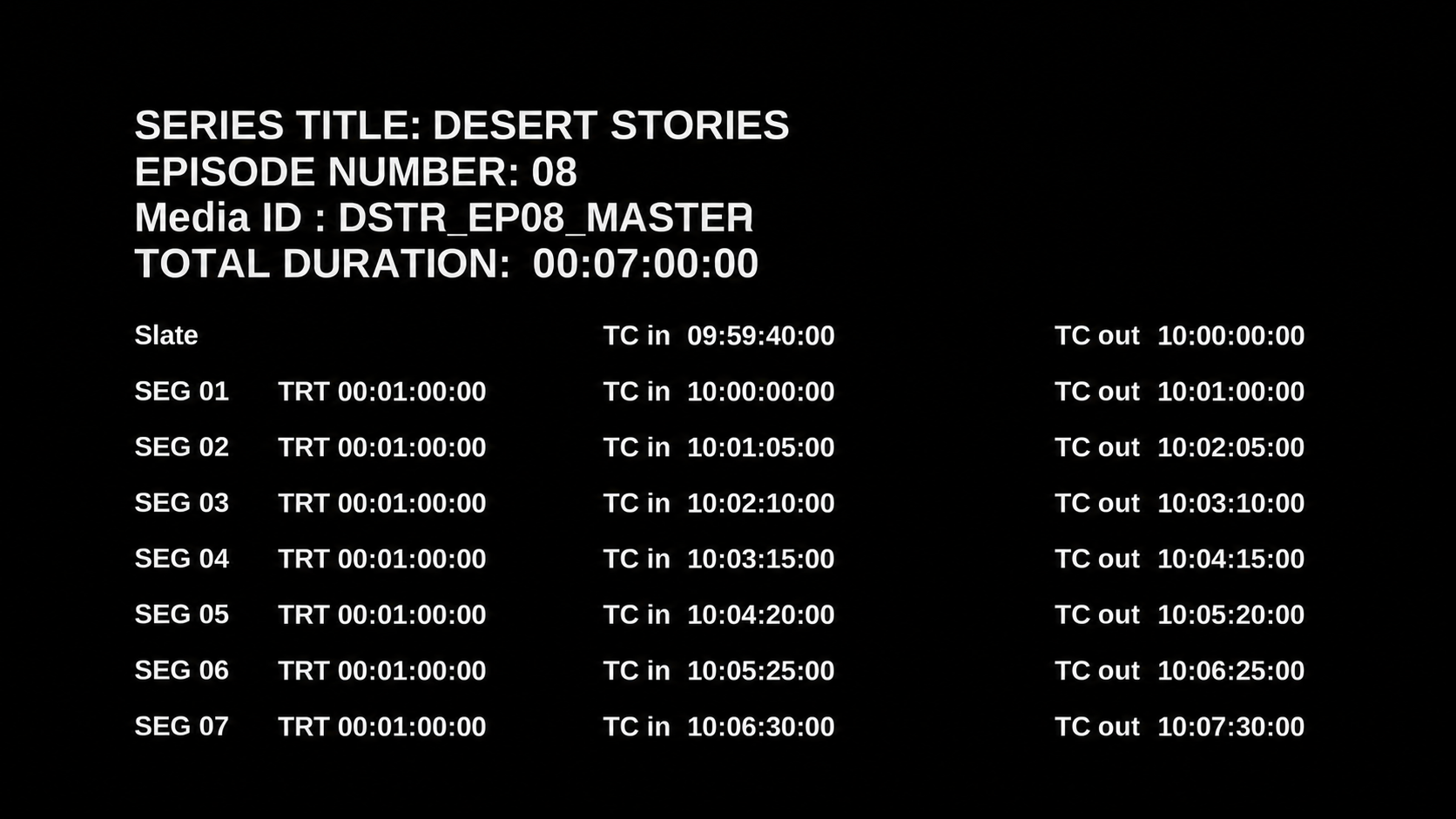
The 1920×1080 image shows the program details, total running time and up to seven rows of IN, OUT and TRT timecodes. TRT means the running time of that individual segment.
TWO EDITING APPS
Install the panel, open it beside your timeline and generate the slate without leaving Premiere Pro.
 Windows + macOS
Run the utility script inside Resolve. It creates the same PNG and adds the file to the current Media Pool.
Before generating a slate, choose the timeline start timecode, program start timecode and frame rate that match your delivery settings.
Installation guide
Your download contains both editions. Follow the guide for your edit system, then restart the host application before opening Segment TC.
Windows + macOS
Requires Premiere Pro 25.6 or later and the Adobe Creative Cloud desktop app.
Open the Segment TC package and locate Premiere Pro/SegmentTC_Premiere_v0.7.0.ccx.
Double-click the .ccx file. Creative Cloud Desktop opens automatically. Choose Install when Adobe shows the third-party plugin notice.
Restart Premiere Pro, then choose Window → UXP Plugins → Segment TC. Dock the panel wherever it fits your workspace.
On first launch, save your company’s Timeline Start Timecode, Program Start Timecode and frame rate. Then open a sequence, add duration markers or paired IN/OUT point markers, enter the title, episode and media ID, and generate the slate.
If the installer does not open, launch Creative Cloud Desktop first and double-click the CCX again. Make sure Premiere Pro 25.6 or later has been opened at least once. If the panel is missing after installation, restart Premiere and check Window → UXP Plugins.
Windows + macOS
The Resolve edition is a Python Utility script. Install Python with Tkinter and Pillow before copying the script.
Install Python 3 from python.org ↗. On Windows, enable Add Python to PATH in the installer. The python.org macOS installer includes Tkinter.
py -m pip install --upgrade Pillowpython3 -m pip install --upgrade PillowPillow installation reference: official Pillow documentation ↗
Run the command for your system. A small Tk window should open and the terminal should print Segment TC ready.
py -c "import tkinter; from PIL import Image; print('Segment TC ready')"python3 -c "import tkinter; from PIL import Image; print('Segment TC ready')"From the downloaded package, copy SegmentTC_Resolve.py into the Utility folder for your operating system. Create the final folders if they do not exist.
C:\ProgramData\Blackmagic Design\DaVinci Resolve\Fusion\Scripts\Utility\%APPDATA%\Blackmagic Design\DaVinci Resolve\Support\Fusion\Scripts\Utility\/Library/Application Support/Blackmagic Design/DaVinci Resolve/Fusion/Scripts/Utility/~/Library/Application Support/Blackmagic Design/DaVinci Resolve/Fusion/Scripts/Utility/macOS tip: In Finder choose Go → Go to Folder…, paste the path, then press Return.
Restart DaVinci Resolve Studio. Open a project and timeline, then choose Workspace → Scripts → Utility → SegmentTC_Resolve.
Use timeline markers, not clip markers. Enter the series title, episode number and media ID, then click Generate PNG + Import to Media Pool and choose where to save the PNG.
Script is not listed: confirm the filename is SegmentTC_Resolve.py, confirm it is inside the final Utility folder, then fully restart Resolve.
Pillow is missing: repeat the install command using the Python installation that Resolve can access.
Tkinter is missing: reinstall Python from python.org with Tcl/Tk support, then repeat the verification command.
No markers found: move the markers to the timeline ruler. Markers attached to individual clips are not read.
WHAT IT DOES — AND DOESN’T DO
Segment TC reads every segment’s IN and OUT, then calculates its TRT and the total program duration.
Every export follows the same readable full-HD slate format, so deliveries stay consistent.
The tool reads markers and creates a separate PNG. It does not move, trim or place clips.
If you can place timeline markers, you already understand the main Segment TC workflow.
PRICING
Both plans include the Premiere Pro and DaVinci Resolve Studio editions for Windows and macOS, plus installation guides and direct email support.
COMMON QUESTIONS
No. It reads timeline markers and generates a separate PNG. It does not move clips or place anything on the timeline.
A duration marker can define one complete segment. You can also use two point markers: the first becomes the segment IN and the next becomes its OUT.
Extract your download, then double-click the included .ccx installer. Creative Cloud Desktop will open; approve the third-party plugin notice, restart Premiere Pro, then open Segment TC from Window → UXP Plugins.
Install Python 3 with Tkinter and Pillow, copy SegmentTC_Resolve.py into the Resolve Utility scripts folder, then restart Resolve and open it from Workspace → Scripts → Utility. The product download includes the exact paths for Windows and macOS.
DaVinci Resolve Studio, Python 3 with Tkinter, and Pillow in the Python environment used by Resolve.
Yes. Set the timeline start timecode, program start timecode and frame rate to match the delivery. You can change those settings later without changing the license.
IN is where a segment starts. OUT is where it ends. TRT is that segment’s total running time. Segment TC calculates these values from the timeline markers.
Yes. Both the Premiere Pro and DaVinci Resolve Studio editions are available for Windows and macOS.
The annual license renews at $129 per year and includes updates while active. The $299 lifetime option is a one-time payment that lets you keep using the version you purchased.